The Eiki LC-XB40N projectors, installed at the Olathe Campus.
If the projector experiences a power surge, it has a built-in self preservation feature (if you can actually call it a feature). When hit with a power surge, it cuts off power to the power supply, so additional surges will not damage the equipment.
When this happens the projector will not power on, and appears as if it is not getting any power at all… As if it’s totally dead.
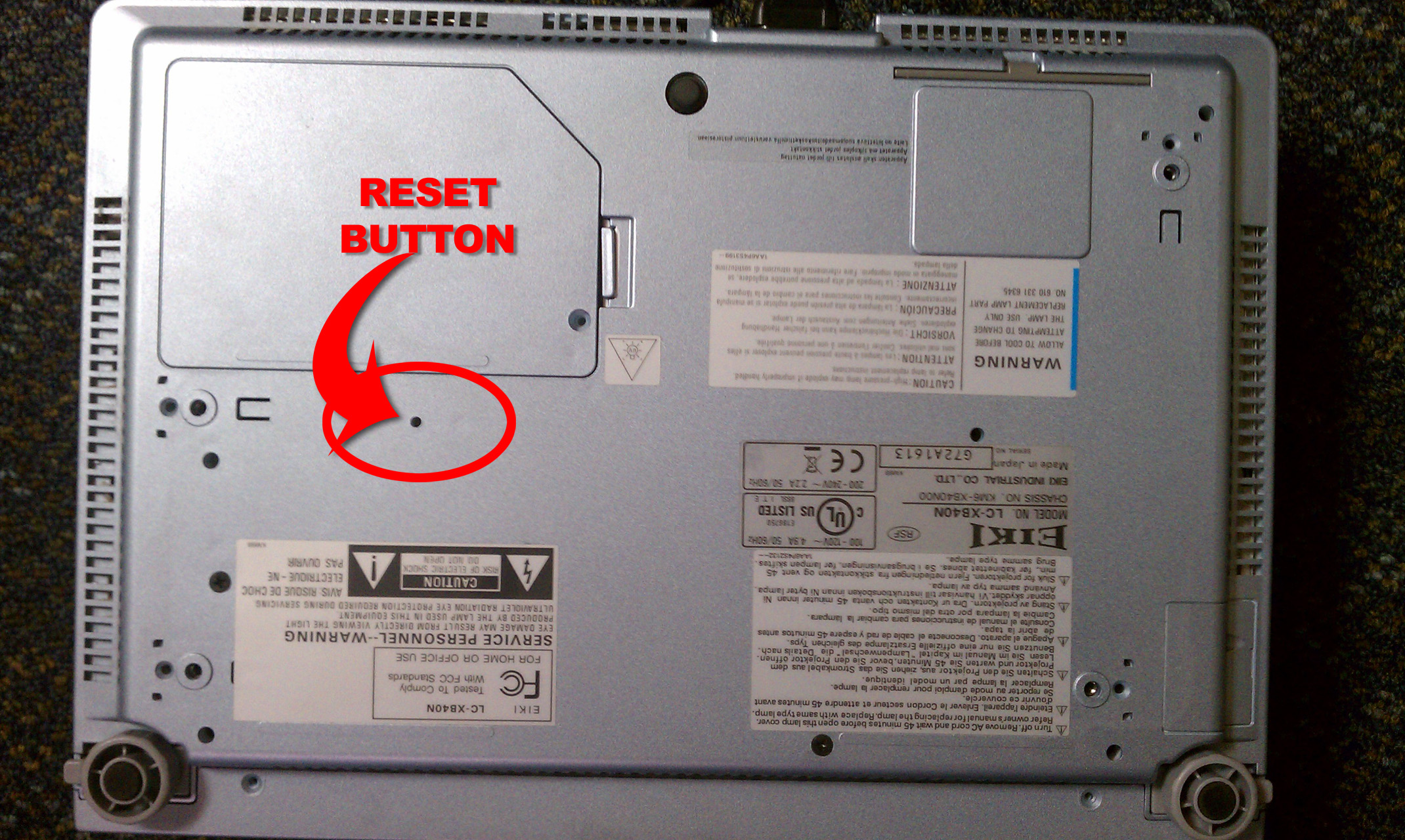
To reset the projector back to working order, you must unplug the power then press & hold the reset button while reconnecting power. This will reset the unit and allow it to operate normally.
This “RESET” button is on the bottom side of the projector and inconveniently (yes, I said inconveniently) located under the ceiling mount. To get to this button, remove the projector from the ceiling mount. Then remove the mount and identify the reset button, to the side of the lamp cover.
Here is a photo of the bottom side of the projector, highlighting where the reset button is located. (Click for a larger image)